Local Deep Research: How to Perform Exhaustive Analysis Without Cloud Data Leaks
The era of "Deep Research" has arrived, but it often brings a massive privacy paradox. While cloud-based agents offer impressive browsing capabilities, they require you to upload your proprietary case files and research plans to external servers. For professionals in law, finance, or R&D, this is a dealbreaker. In this guide, we reveal how to build a high-performance research pipeline that stays 100% local.
What is Deep Research (and Why It's Usually Unsafe)
Deep research isn't just a chat; it's an orchestration of multiple tasks. It involves formulating research questions, browsing the live web, parsing hundreds of pages of literature, and synthesizing a final report. Standard tools perform this in the cloud, meaning every document you upload and every query you make is stored and potentially used for model training.
The risk of "Tab Chaos" and data leakage is high when you have to juggle between browser-based AI, search engines, and local folders. You need a unified command center that respects your boundaries.
The "In Seconds" Workflow: From Query to Report
How does a professional perform deep research using Swipeer? The goal is to move from a complex question to an exhaustive report in record time, using a **"Workforce Multiplier"** approach.
1. Context Seeding with Local AI Brains
First, you "seed" your research. Instead of re-uploading files every time, you create a dedicated Swipeer AI Brain for your project. Drag in your existing PDFs, CSV datasets, and internal briefs. This setup takes less than 30 seconds.
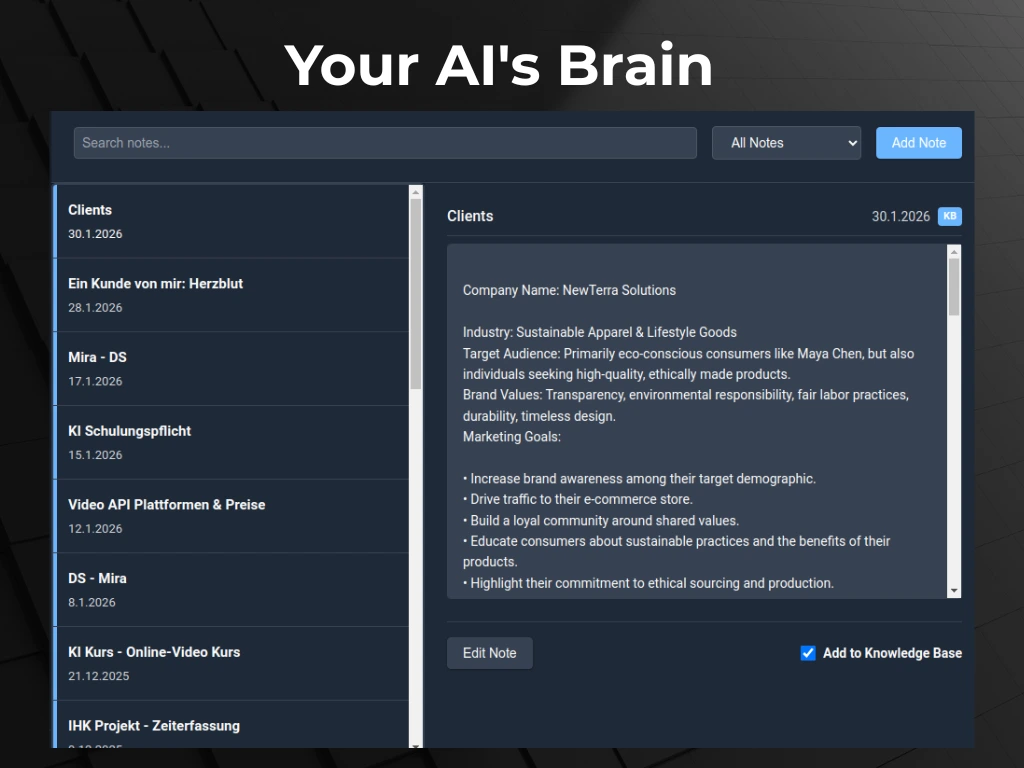
Because Swipeer is local-first, these files never leave your machine. The AI "knows" your business context from the start of every session. This is the foundation of **personalization without compromise**.
2. Local Reasoning with High-Performance LLMs
For the reasoning phase, use models like Llama 3 70B or DeepSeek-R1 running locally via Ollama. These models can identify patterns, outline reports, and extract data from your local Brain without an internet connection.
Boldly automate the reasoning: Ask the AI to "Identify the top 5 market trends from these 20 research papers." It happens locally, at hardware speed, with zero latency.
3. Secure Web Triangulation
When you need live data, use Swipeer's Parallel Workflows. Open a local chat for internal data on the left, and a web-enabled model (like GPT-4o with Search) on the right.
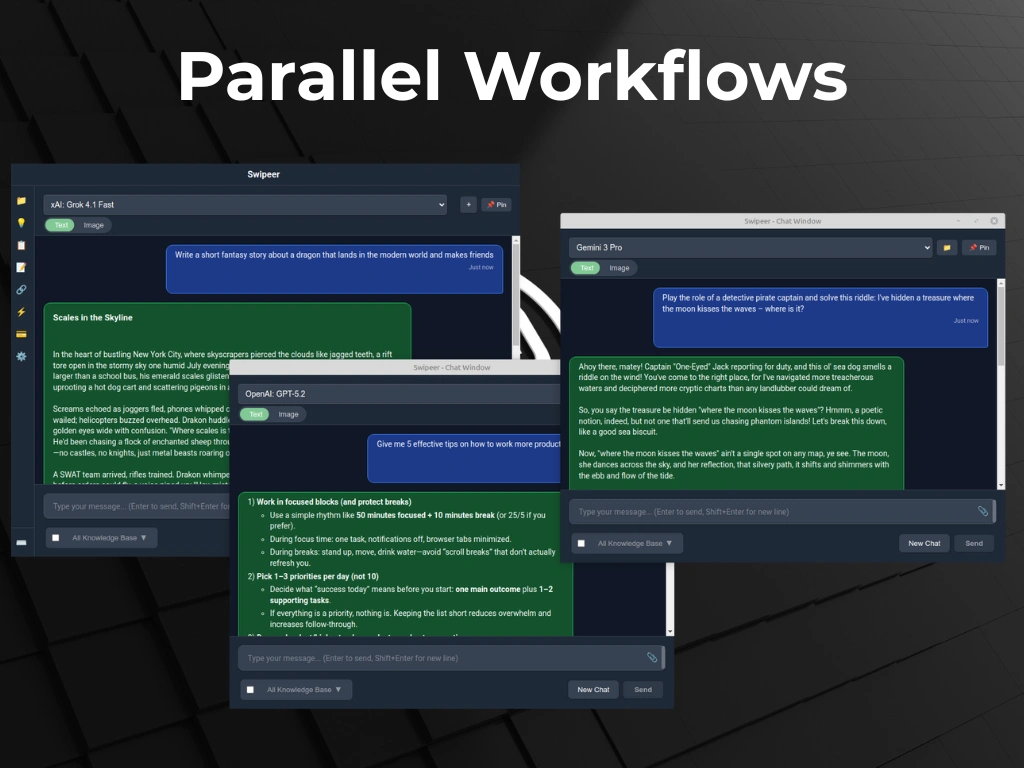
Broadcast your query to both. This allows you to compare internal "ground truth" with public information side-by-side. You find the guaranteed best answer by triangulating between local certainty and global awareness.
Why "Tab Chaos" is the Enemy of Deep Work
Professionals are switching from browser-based AI to native desktop tools like Swipeer because browser tabs are designed for consumption, not deep work.
- Shortcuts: Summon the AI instantly with a global hotkey while reading a PDF.
- Persistent Context: Your research folders are always "live" in the sidebar.
- Privacy First: Switch to "Local Only" mode with one click when handling sensitive HR or legal data.
This approach is a **10x workflow** improvement over the manual bridge between the browser and your desktop.
"The safest way to process a confidential document is to ensure it never leaves the room—digitally speaking."
Niche Highlight: Research for Privacy-Critical Professions
As discussed in our post on Secure AI for Law Firms, legal and medical professionals have a fiduciary duty to protect client data. Swipeer’s local-first architecture fulfills this requirement while providing the same analytical power as cloud-only tools.
Recipe for Success: The Deep Research Blueprint
- The Problem: Analyzing 50+ case documents takes 4 hours of manual reading.
- The Swipeer Workflow: Drag folder to 'Case Brain' -> Select 'Llama 3' -> Prompt: 'Synthesize case timeline and key conflicts.'
- The Result: A 10-page draft report generated in **15 seconds** with 100% data privacy.
Pro Tip: Long-Tail FAQ Strategy
To truly master deep research, you should anticipate the questions your data will raise. Use the Swipeer **Prompt Templates** to build a recurring list of "Red Team" questions that challenge your findings.
How to Get Started in Under 3 Minutes
Ready to 10x your research speed? The setup is instant.
- Download Swipeer: Install the native desktop app.
- Install Ollama: Download local models with one click in the settings.
- Create your first Brain: Drop a few files in and start querying.
Conclusion: Security as a Competitive Advantage
In 2026, the ability to perform deep research while keeping your data sovereign is a massive competitive advantage. You can process faster, more securely, and more accurately than those trapped in browser-based tab chaos.
For more on secure workflows, check out our guide on Stopping Tab Chaos or see our Pricing Plans to find the right setup for your team.
Frequently Asked Questions
How do I perform deep research locally with AI?
To perform deep research locally, use Swipeer to create an 'AI Brain' containing your source files. Select a local model like Llama 3 via Ollama, and ask the AI to synthesize findings. The entire process happens on your hardware, ensuring privacy and speed.
Is local AI better for deep research than cloud tools?
Local AI is superior for deep research involving sensitive data. It offers zero latency for large file analysis, 100% privacy, and the ability to work offline. Cloud tools are better for general web-searches, but Swipeer allows you to combine both in a secure, parallel workflow.
Can I use Llama 3 for exhaustive data analysis?
Yes. Modern open-source models like Llama 3 and DeepSeek-R1 are highly capable of reasoning and exhaustive analysis. When run via Swipeer, they can parse complex CSVs and PDFs to extract insights as accurately as cloud models like GPT-4.
How can I summarize a YouTube video with AI locally?
While YouTube itself is on the web, Swipeer can parse video transcripts and summarize them using your local model, keeping your analysis and notes private on your machine.
Stop Juggling Tabs. Start Deep Research.
Experience the power of a 10x workflow. Download Swipeer and secure your AI research today.