How to Use AI 100% Offline (The GDPR-Compliant Way)
Generative AI has become an indispensable tool in the modern workplace. Whether drafting emails, summarizing lengthy meetings, or analyzing market data, AI saves countless hours. However, for a specific cohort of professionals, a massive roadblock exists: Data Privacy and Non-Disclosure Agreements (NDAs).
Lawyers, human resources (HR) managers, medical professionals, and management consultants work daily with highly sensitive, confidential data. A client contract, a medical diagnosis, or an employee's salary details can never be exposed to unauthorized third parties. Yet, technically, that is exactly what risks happening when this sensitive text is copied into cloud-based AI chats like ChatGPT (OpenAI), Claude (Anthropic), or Gemini (Google).
The definitive solution in 2026? Local-First Artificial Intelligence.
In this comprehensive guide, we'll explain why cloud AI is often unacceptable for sensitive professions, and provide a step-by-step roadmap to setting up a 100% GDPR-compliant, offline AI on your own computer within minutes.
Why ChatGPT & Claude Are Often Taboo for Law Firms and HR
The Problem with Cloud Processing
When you enter text into ChatGPT, it is transmitted over the internet to OpenAI’s servers (often located in the USA). The data is processed there, a response is generated, and then sent back to your browser.
The inherent risks:
- Loss of Data Control: You cannot guarantee on which physical servers the data lands, nor control temporary caching mechanisms.
- Model Training: In standard consumer accounts across many providers, user prompts and data are sometimes utilized to train future AI models. Even if opted-out, a catastrophic data breach on the provider's end remains a terminal risk.
- Legal Repercussions: Uploading sensitive client data (names, addresses, bespoke contract clauses) to external, unsanctioned US servers almost universally violates the European General Data Protection Regulation (GDPR) and fatally breaches professional confidentiality (such as attorney-client privilege).
A lawyer who asks ChatGPT to summarize a client contract is generally committing a severe compliance breach. An HR manager uploading CVs to the cloud is violating candidate privacy rights.
Is an "Enterprise License" Secure Enough?
Many tech giants argue that their Enterprise licenses (e.g., ChatGPT Enterprise, Microsoft Copilot) enforce strict "Zero-Data-Retention" policies—meaning data isn't saved long-term or used for training.
Despite these assurances, the core issue persists: the data still leaves the company's premises. For government agencies, prominent law firms, or heavily regulated industries (banking, healthcare), even encrypted transmission to a trusted third party is often forbidden by internal IT security doctrines.
The Solution: Local-First AI & Generative Models on Your Mac
The most secure alternative to the cloud is paradoxically the simplest: The AI must run on your own computer.
What is "Local-First AI"?
Local-First means the primary data center for your artificial intelligence isn't sitting in a massive Silicon Valley warehouse—it’s sitting on your desk. Between 2024 and 2026, open-source AI models made staggering leaps in efficiency. Models like Meta's Llama 3, Mistral Core, or Google's Gemma are now highly optimized and compact enough to run flawlessly on modern laptops (especially Apple MacBooks featuring M-Series chips with Unified Memory Architecture).
How Does it Work 100% Offline?
Modern AI architectures do not inherently require constant internet access to generate text. Once downloaded, the entirety of the AI's "knowledge" (the neural network's weights) resides locally on your hard drive.
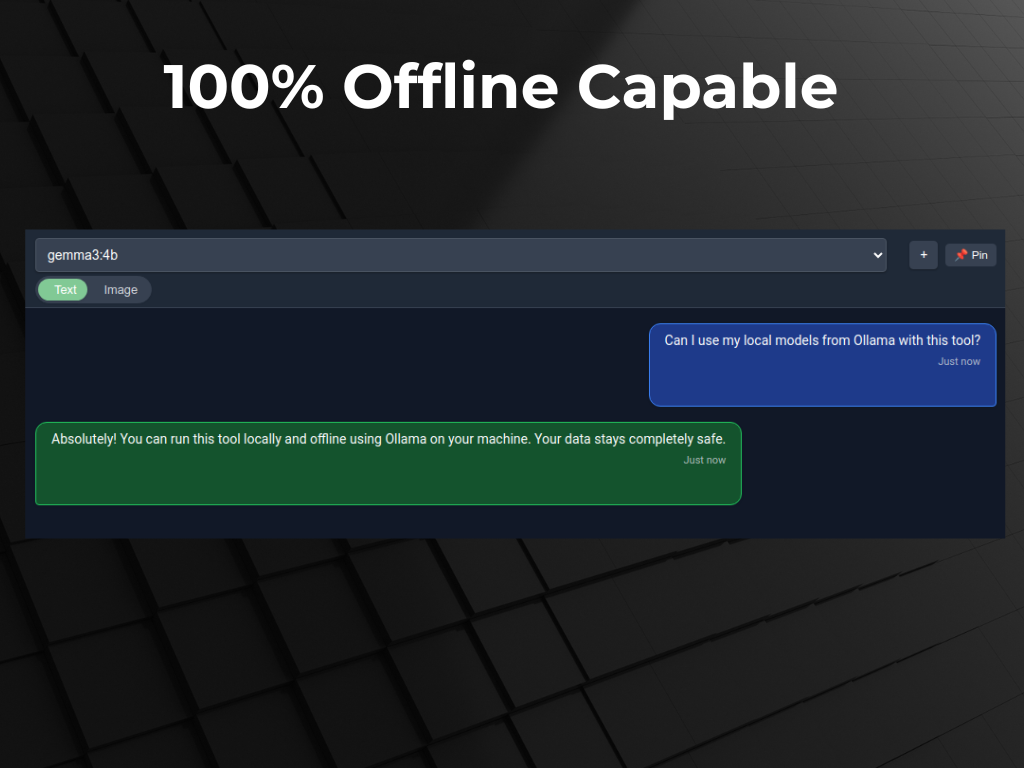
The AI application loads locally. The prompt is sent to the processor locally. The math is calculated locally, and the output is rendered locally. At no point is a single byte transmitted over the internet. It is the Fort Knox of data privacy.
Use Cases: Local AI in Daily Professional Practice
What does working with a purely local AI look like in the real world? Here are three highly specific use cases for professions with stringent compliance demands:
1. Lawyers & Paralegals: Contract Analysis in Seconds
A lawyer receives a 100-page PDF containing highly sensitive litigation data. Cloud processing is strictly prohibited under penalty of disbarment. Using a local desktop application like Swipeer, they simply drag and drop the PDF into the chat interface. Swipeer's local Vision/File Analysis engine extracts the text and feeds it into the offline-running model (e.g., Llama 3). The lawyer can now ask targeted queries:
- "Summarize the liability waivers found on page 24."
- "Review this entire agreement for clauses that are invalid under German commercial law, keeping the local precedents in mind."
Result: Massive time savings without compromising attorney-client privilege in the slightest.
2. HR Managers: GDPR-Compliant CV Screening
An HR department must review hundreds of applications (PDFs laden with names, photos, addresses, and personal histories). The hiring managers open Swipeer and instruct the offline local models to filter candidates mentioning specific keywords ("Python," "Machine Learning," "5 years experience"). Furthermore, drafts for employee reference letters can be generated based on local HR notes. Because no internet connection is required, GDPR is fully satisfied. Zero candidate data leaves the company laptop.
3. Management Consultants & Analysts: Evaluating Internal Financials
Consultants frequently handle unannounced quarterly earnings, pre-merger (M&A) data, and highly restrictive CSV spreadsheets. Even minor data leaks could trigger insider trading probes. By setting up a Local AI Brain, consultants can ingest these CSV files locally. The offline AI acts as a tireless "Junior Analyst" recognizing trends or writing pivot summaries—entirely siloed on the secure consultant laptop.
How to Setup a GDPR-Compliant AI Environment (In 3 Steps)
Setting up local AI today takes less than 10 minutes and requires zero programming knowledge. The optimal stack consists of two components: Ollama (the local AI engine) and Swipeer (the native desktop frontend).
Step 1: Install Ollama (The Engine)
Ollama is open-source software that makes it incredibly easy to run Large Language Models (LLMs) locally.
- Go to the Ollama website and download the application (e.g., for macOS).
- Once installed, open your Terminal and simply type:
ollama run llama3.2 - Ollama will securely download the model to your machine. It is now ready to run offline.
Step 2: Install Swipeer as your AI Interface (The Dashboard)
The Terminal is not user-friendly for a lawyer or HR executive's daily workflow. You need a modern chat interface capable of handling PDFs, retaining context, and triggering instantly via keyboard shortcuts.
- Head over to Swipeer and download the desktop app.
- Swipeer automatically detects your Ollama installation running in the background.
- In the top left of the Swipeer interface, simply select your newly downloaded local "Llama" model instead of a cloud provider.
Step 3: Leverage the "Local AI Brain" Approach
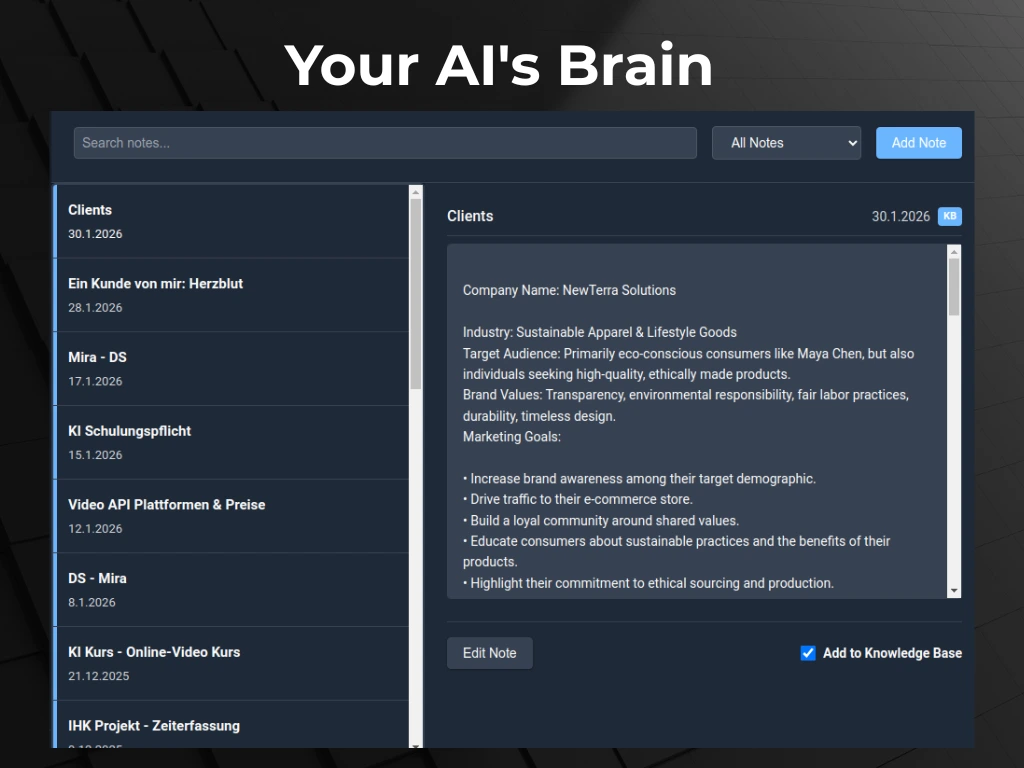
Swipeer's superpower for professional workflows is the Local AI Brain. Instead of painfully re-uploading PDFs for every new chat session, you build persistent, local knowledge bases. You can create a "Brain" titled "Project Alpha M&A 2026," drop hundreds of pages of financial documents into it, and have the local AI work reliably within that exact context over weeks—all secured locally without any repetitive copy-pasting.
Frequently Asked Questions (FAQ) regarding AI, Privacy & Offline Models
Is local offline AI as smart as ChatGPT-4o?
Not entirely. Massive models like GPT-4o rely on colossal data centers containing terabytes of RAM. Local models (like Llama 3 8B) are highly compressed to run efficiently on an average laptop equipped with 16GB to 32GB of RAM. However, for everyday professional tasks—document summarization, drafting emails, translation, and structuring unstructured data—these local models in 2026 are exceptionally capable and are rapidly closing the intelligence gap.
Are my prompts used to train the local AI?
No. During purely local execution via Ollama and Swipeer, no "fine-tuning" (training) of the neural weights takes place based on your inputs. The AI reads your prompt, generates the output, and "forgets" the prompt's existence upon ending the session. Given that execution is 100% offline, absolutely no usage data is sent back to the model creators.
What hardware do I need to run AI locally in my firm?
For a seamless workflow, we highly recommend an Apple Mac running M-Series Silicon (M1, M2, M3, or newer). Because Mac CPUs share "Unified Memory" directly with the integrated graphics processing unit, they are uniquely equipped to handle the massive memory bandwidth required for high-speed local AI generation without needing obscenely expensive add-on graphics cards. Generally, 16GB of Unified Memory is the baseline, while 32GB+ provides a premium, blazing-fast experience.
Can Swipeer be launched without an internet connection?
Yes! If you have selected an Ollama/Local model in your settings, Swipeer functions perfectly on an airplane, a train, or within an air-gapped corporate network. The application was built on a Local-First philosophy, meaning offline inference requires zero ping to the outside world.
Conclusion: The Future of Productivity is Local
The excuse that AI cannot be utilized in enterprise environments due to NDAs, compliance, or GDPR constraints is officially obsolete. By combining the staggering capabilities of open-source models with secure, native desktop clients like Swipeer, lawyers, HR managers, consultants, and developers can harness the immense power of Generative AI without ever compromising data privacy.
Ready for GDPR-Compliant AI on your Mac?
Join privacy-conscious professionals worldwide. Download Swipeer today and connect local open-source models seamlessly to your daily workflow.